One bid. Three options. Their choice.
Quote the repair, the straight replacement, and the upgrade on one estimate. The customer compares tiers on their phone, picks one, and signs. The tier they choose becomes the contract, and the job bills from it.
Free during beta. No demo call, no credit card, no contract.
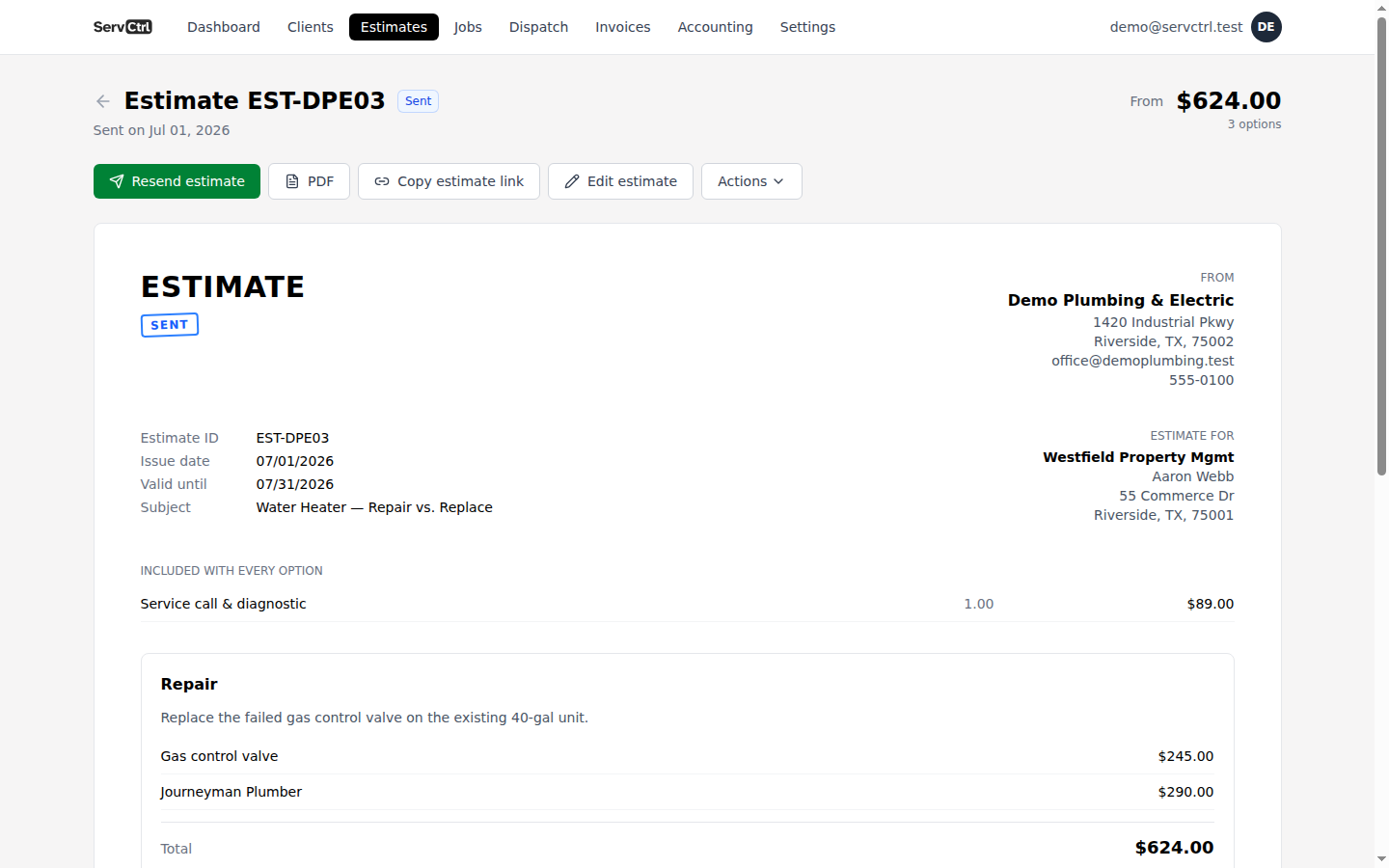
Three steps, no busywork.
- 1
Build the tiers
Turn on options and add up to three named tiers over the same base scope. Pull lines from your price book into each one, and mark the one you’d recommend.
- 2
Send one link
The customer opens one clean bid and sees each option priced out, with your recommended tier pre-selected. No three separate PDFs to keep straight.
- 3
They pick, you convert
They choose a tier and sign. That tier is the contract: it drives the job, the deposit, and every invoice. The tiers they passed on are cleanly retired.
Why shops quote three ways
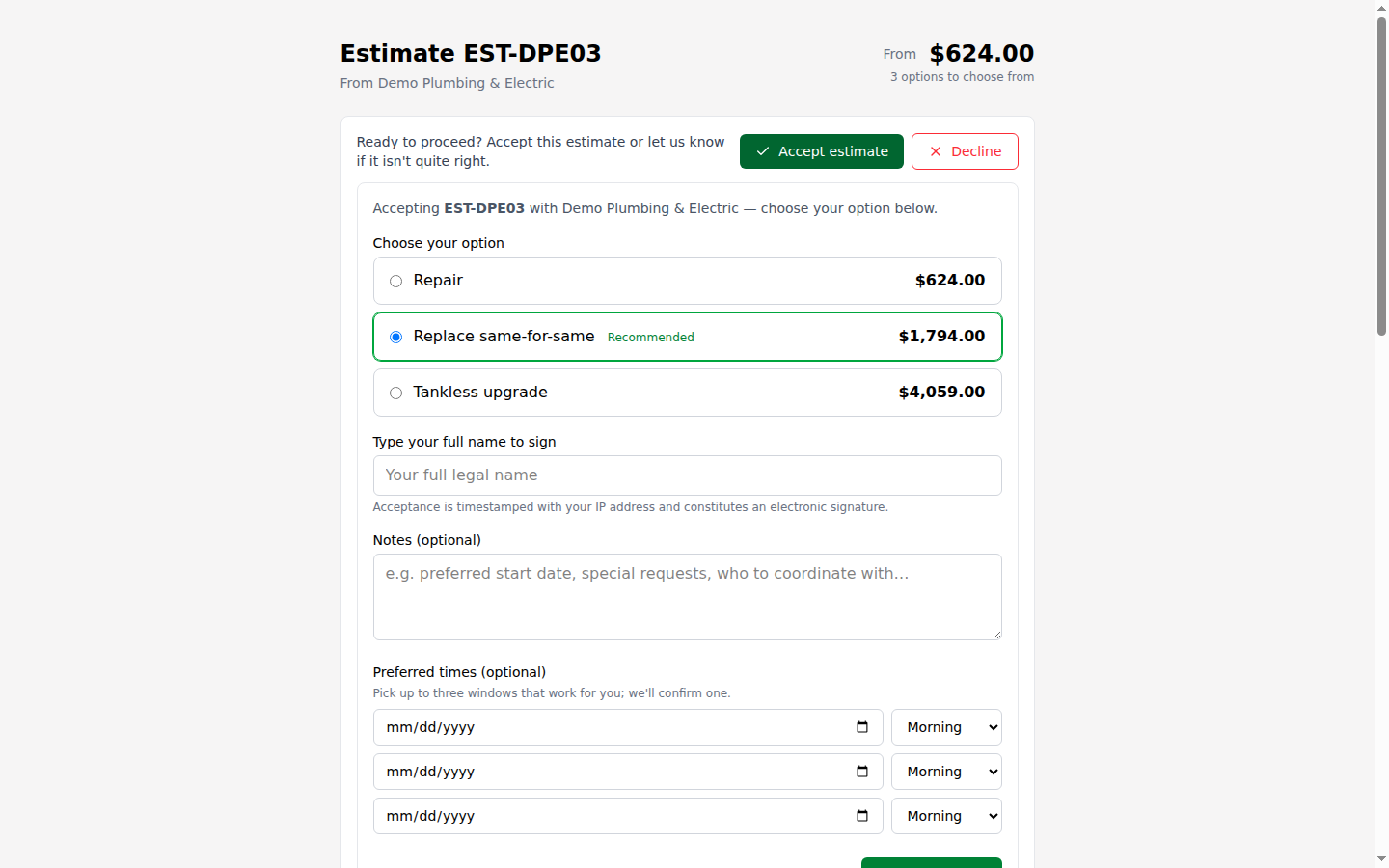
A water heater call can be a repair, a same-for-same swap, or a tankless upgrade. Quote only the repair and the upgrade never comes up. Put all three on the bid and the customer talks themselves into the middle one at their own kitchen table, without a hard sell from your tech.
The chosen tier becomes the contract
This isn’t a brochure with three prices on it. When the customer accepts a tier, the estimate recomputes to that tier and the job inherits it: the total, the deposit, and any partial bills you send as the work moves along. Nothing gets retyped, and nobody makes the "which option did they take?" phone call.
Included, not an add-on
In most field-service tools, option-based proposals are a paid add-on or live in the top plan. In ServCTRL they’re part of estimating, in the one flat price. And they’re optional per bid: a drain call stays a one-line quote, the install gets the three tiers.
Questions, answered.
Do I have to use options on every bid?
No. Options are off by default. A simple service call stays a single flat-rate list; flip options on when the job has a real decision in it.
Can I name the tiers something else?
Yes. Tiers are named, and the Good/Better/Best badge is optional. "Repair," "Replace," and "Upgrade" work just as well.
What does the customer see before they choose?
One estimate with each tier broken out and priced, starting from the cheapest. Your recommended tier comes pre-selected. They pick one and sign, all on their phone.
Does my price book need three prices per item?
No. The catalog stays one flat price list. Tiers live on the estimate: you build each option from the same book, adding or swapping lines per tier.
It all stays connected.
Price Book
Price Book
Learn moreDispatch
Availability-aware dispatch
Learn moreEstimating
Estimates clients e-sign
Learn moreContract invoicing
Contract invoicing
Learn moreField app
Phone-first field app
Learn moreNo per-user pricing
One flat price
Learn moreNo time tracking
No time sheets. On purpose.
Learn more